Cookie Clicker began in August 2013 as a free web browser experiment created by French developer Julien 'Orteil' Thiennot. In September 2021, an official standalone edition launched on Steam in partnership with publisher Playsaurus.
Players frequently ask whether the Steam version offers different gameplay mechanics, whether saves can be transferred, and which version fits their playstyle best. Here is an objective breakdown of what is officially identical and what is distinct.
1. Core Gameplay Mechanics Are 100% Identical
From a pure game balance and mathematical standpoint, the web browser version and the Steam version share the exact same core codebase. Building costs, CPS formulas, upgrade tiers, Sugar Lump cycles, minigames (Grimoire, Garden, Stock Market, Pantheon), and the Ascension prestige tree operate identically in both versions.
Neither version contains pay-to-win microtransactions or gameplay paywalls. The core joy of baking cookies remains entirely authentic regardless of platform.
2. Exclusive Features of the Steam Edition
The Steam release introduces several platform-level enhancements designed for desktop PC players:
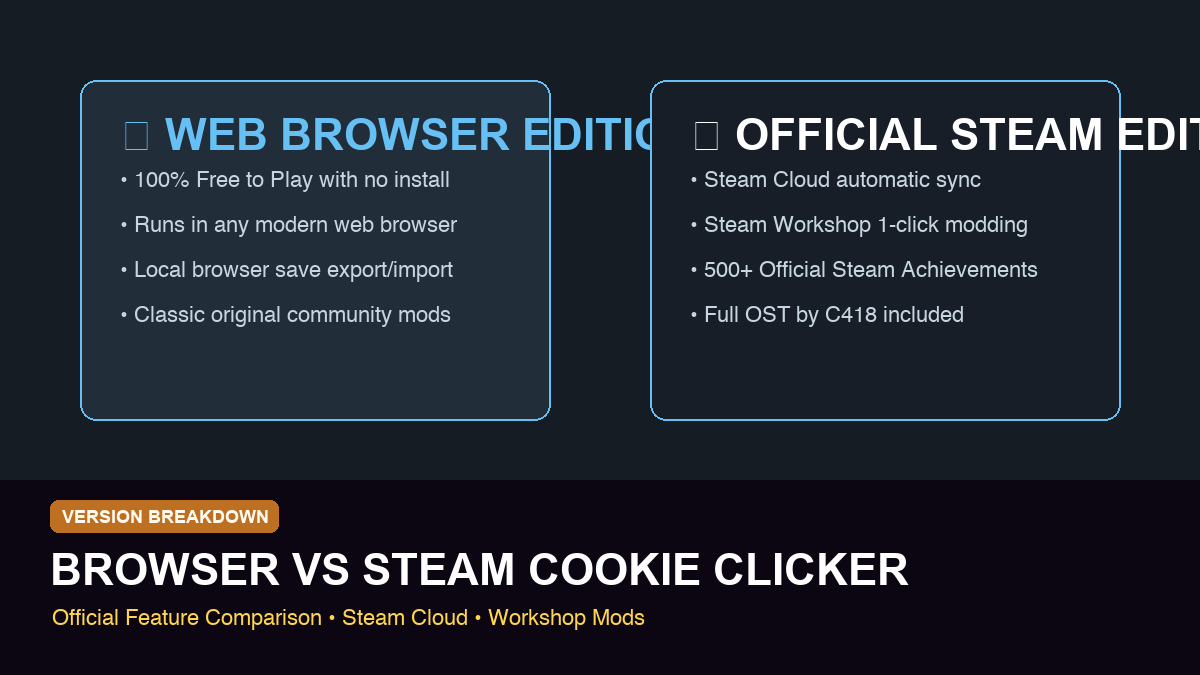
• Full Original Soundtrack by C418: Includes over 30 ambient music tracks and soundscapes composed by C418, complete with in-game music selector.
• Steam Cloud Synchronization: Your bakery progress automatically synchronizes across multiple computers logged into your Steam account.
• Steam Workshop Mod Support: One-click subscription to community mods, visual skins, audio packs, and quality-of-life add-ons.
• 500+ Steam Achievements: Direct integration with Steam profile showcases, badges, trading cards, and background rewards.
• Herald Global Multiplier: A special prestige upgrade that grants +1% CPS per 100 active Steam players (capped at +100% global boost).
3. Strengths of the Web Browser Version
The browser version continues to be actively maintained and holds distinct advantages for everyday casual play:
• 100% Free to Play: Instant access with zero download, zero installation, and no launcher required.
• Universal Device Compatibility: Runs on Chromebooks, work laptops, tablets, and any device equipped with a modern web browser.
• Instant Tab Management: Easy to keep open in a background browser tab while multitasking or studying.
- Web: Zero install, universal browser compatibility, instant tab access.
- Steam: Desktop client, Steam Cloud sync, C418 music, Steam Workshop mods.
- Both versions receive synchronized balance updates from Orteil.
- Both versions support full text-based save imports and exports.
4. Save File Transfer and Cross-Compatibility
Because both versions use the same save data structure, transferring your bakery between web and Steam takes less than 10 seconds. In either version, open the Options menu, click 'Export Save', and copy the text string to your clipboard. Then open the other version, click 'Import Save', paste the code, and your entire progress will resume seamlessly.
5. Choosing the Right Version for Your Setup
If you play across multiple computers with Steam installed and love collecting Steam profile badges and listening to C418's soundtrack, the Steam release is well worth supporting. If you want a quick, free, lightweight clicker to enjoy on any browser without overhead, the web edition remains flawless.
6. Modding and Community Tools
Both versions support quality-of-life tools like Cookie Monster. On Steam, mods are enabled with one click via Workshop; on the web, mods can be loaded as browser bookmarks or user scripts.
7. The Herald Global Community Multiplier
One of the most unique mechanical differences on Steam is the 'Heralds' system. In the Steam edition, Heralds grant +1% CPS per 100 concurrent players currently playing Cookie Clicker on Steam globally, up to a maximum boost of +100%.
Because thousands of players are active on Steam daily, Steam players enjoy a virtually permanent 2x global production bonus as a community benefit. This passive boost speeds up early-game progression noticeably compared to standalone browser saves.
8. Steam Workshop Modding Ecosystem
The Steam Workshop allows players to install popular quality-of-life tools like Cookie Monster, custom sound packs, seasonal visual re-themes, and detailed mathematical analysis overlays with a single click.
While web users can inject similar user scripts through browser consoles or extensions, Steam Workshop eliminates technical friction with automated mod updates, conflict resolution, and safe sandbox integration.
9. Steam Trading Cards, Badges, and Profile Showcases
Playing the Steam edition unlocks exclusive Steam Trading Cards, profile emoticons (like Grandma and Golden Cookie emojis), and animated profile backgrounds that can be showcased on your global Steam community profile.
Frequently Asked Questions
Can I transfer my browser save to the Steam version?
Yes! Use 'Export Save' in your browser game's Options menu, copy the text code, and paste it into 'Import Save' in the Steam version.
Does the Steam version have different minigames or buildings?
No. The gameplay, minigames, buildings, and updates are mechanically identical across both official editions.
Is the music available in the free browser version?
The official C418 soundtrack is exclusive to the Steam edition, though the music can also be streamed on official music platforms.
Ready to test your strategy?
Jump into Cookie Clicker 2 in your browser. Apply these upgrade routes, Golden Cookie combos, and ascension timings directly in the live game.
Verified Sources & References
Official Cookie Clicker Steam page
Used for the release timeline, official Steam positioning, and Steam-specific feature list.
https://store.steampowered.com/app/1454400/Cookie_Clicker/
Official browser version
Used as the official web endpoint referenced by the Steam description's original web-release framing.
https://orteil.dashnet.org/cookieclicker/
Related Guides
View allCookie Clicker Ascension Guide: When to Ascend and What to Buy First
A practical Cookie Clicker ascension guide for first ascension timing, Heavenly Chips, prestige levels, and early permanent upgrade choices.
Cookie Clicker Golden Cookie Guide: Frenzy, Lucky, and Combos
A practical Cookie Clicker Golden Cookie guide covering Frenzy, Lucky, Click Frenzy, Dragonflight, Get Lucky, and combo windows.